PI System Data Resiliency · PI Vision
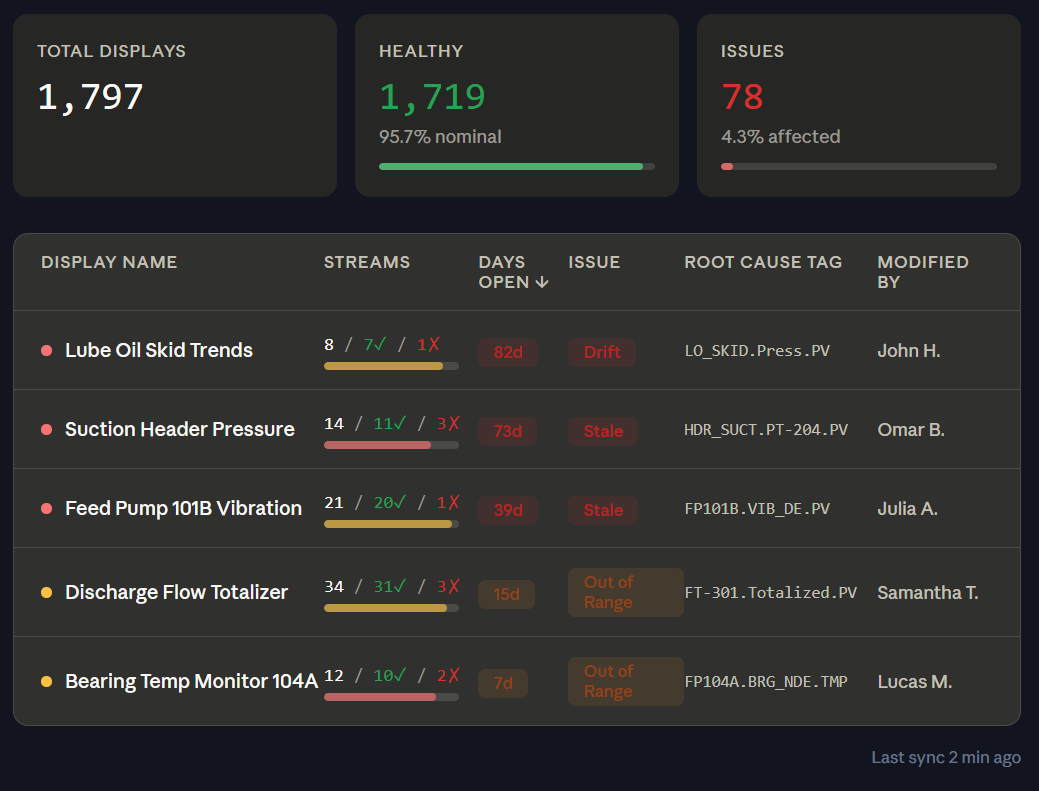
Operators and managers experience the symptom on the display: slow load times, missing values, incorrect numbers, or frozen metrics. But the cause lives somewhere upstream — and PI Vision itself is rarely the problem. The real issue is usually a configuration or data quality failure further up the dependency chain.
Expensive calculations embedded directly in display symbols — long rolling averages, complex expressions, or calculations that re-run on every refresh — can make displays unusable for operators.
A tag showing an incorrect value, a stale reading, or a system error state is often the result of a broken AF analysis, a failed interface, or a configuration change no one tracked.
A single stale tag or broken AF reference can corrupt every KPI that depends on it, affecting multiple displays and multiple teams who rely on those numbers.
Many PI Vision performance problems originate from calculation logic embedded directly in display symbols — logic that should live in AF analyses, not in the display layer. Tycho identifies expensive and fragile display-level calculations before they become operator complaints.
Long rolling averages computed at the display layer on every refresh are a common cause of slow load times in high-tag-density displays.
Display symbols that reference other calculations, creating complex dependency chains that are difficult to trace, maintain, and debug.
Symbols bound to tags that have been renamed, moved, or deleted — causing persistent error states that undermine operator trust.
Values that have not updated in hours but show no obvious error, causing operators to question whether the display is live or frozen.
For any value shown in a PI Vision display, Tycho traces the full dependency chain back to the originating data source. This turns hours of manual investigation into a guided path from symptom to root cause.
Not all display issues have equal impact. Tycho helps teams prioritize remediation based on which displays are most actively used by operators, which bad values are visible in critical workflows, and which calculations carry the highest performance cost. Fix the issues that matter most before they become escalations.
Focus on the displays operators actually use, not the displays no one has opened in months.
Identify which bad values are surfaced directly to operations teams and risk driving incorrect decisions.
Identify the display calculations with the highest performance cost and prioritize moving them to the AF layer.
Get visibility into display health, expensive calculations, broken references, and the upstream root causes that are eroding operator trust in your PI Vision environment.
 Tycho Data helps teams ensure their operational data is reliable, accessible, and actionable.